
150
2
0
小氢云主机系统工作流教程
2026-05-25
2026-05-25
文章摘要
|
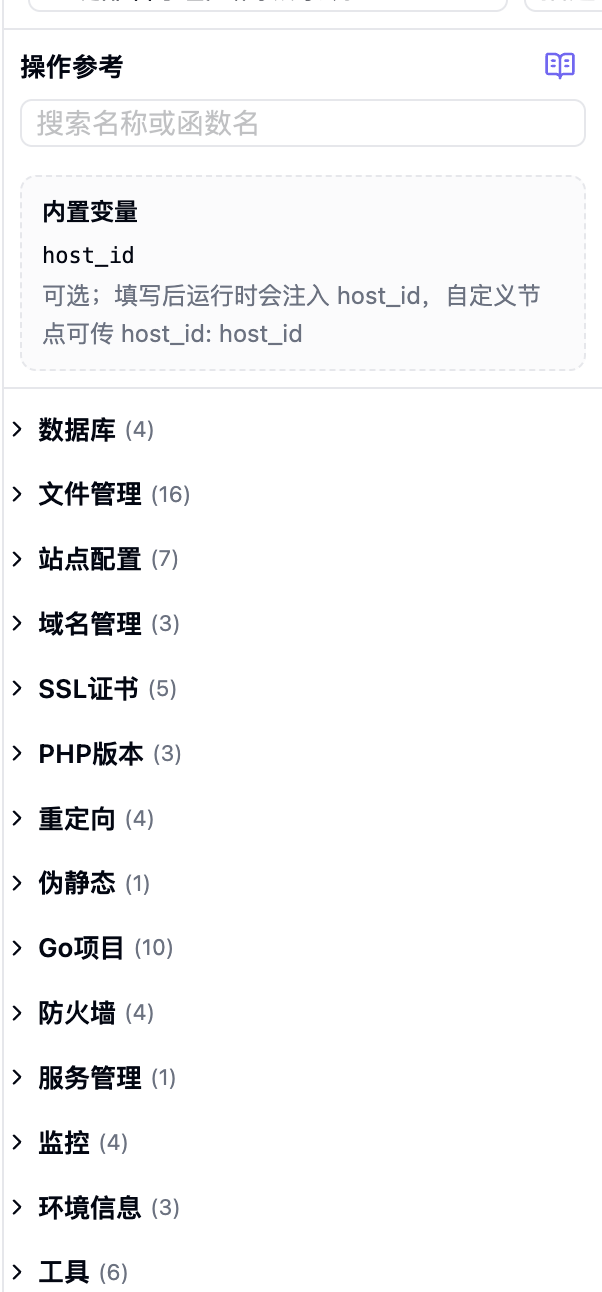
自带节点函数
系统里提供了一些自带的节点函数,比如

点一下节点函数就可以查看详细信息

我给你们写了一个 一键部署 Go 程序的脚本,你们可以参考一下,功能正常可以直接使用
脚本里有一段是上传文件,用的是 @,@的意思就是 /doc 目录!也就是下面的这张图,你要把你部署的程序安装包放进去

/**
 * jjwk-service 一键部署工作流
 *
 * 执行顺序(幂等设计,可重复运行):
 *   [01] 初始化 → 拉取主机/用户信息,弹窗选择或输入绑定域名
 *   [02] 部署包 → 远程无 zip 才上传,上传后二次校验
 *   [03] 解压   → 二进制不存在,或刚上传且 forceUnzipAfterUpload=true 时解压
 *   [04] 数据库 → 不存在则创建,存在则复用主机记录中的账号信息
 *   [05] 配置   → 写 config.yaml(数据库 + app.base_url)
 *   [06] 端口   → 防火墙放行服务端口(已放行则跳过)
 *   [07] Go项目 → 查重后创建/跳过,本地绑定域名,启动项目
 *   [08] 通知   → 有邮箱则发 HTML 邮件汇总
 *
 * 注意:
 *   - 工作流 API 参数名(host_id、host_source 等)为 snake_case,与后端一致
 *   - 脚本内部变量统一 camelCase
 *   - hostId 可在编辑器顶部「执行主机 ID」覆盖,此处为默认值
 */

// ========== 配置 ==========

/** 目标主机 ID(与编辑器顶部 host_id 注入二选一,此处为脚本内默认值) */
const hostId = "";

/** 本地部署包路径(@/ 表示系统 doc 目录下的相对路径) */
const localPackagePath = "@/jjwk-service-v2.4.8-install.zip";

/** 上传到远程站点目录后的 zip 文件名 */
const packageFileName = "jjwk-service-v2.4.8-install.zip";

/** 解压后的 Go 二进制文件名(需与 zip 内一致) */
const binaryFileName = "jjwk-service";

/** 主机未配置端口时的默认监听端口 */
const defaultPort = 9001;

/**
 * 上传新包后是否强制重新解压
 * true  = 即使二进制已存在,刚上传完也会覆盖解压
 * false = 二进制已存在则跳过解压
 */
const forceUnzipAfterUpload = true;

// ========== 日志工具 ==========

/** 全局递增序号,供 logInfo 使用 */
var logSequence = 0;

/** 序号补零:1 → "01",12 → "12" */
function padLogIndex(value) {
  return value < 10 ? "0" + value : String(value);
}

/**
 * 主步骤日志,自动递增序号
 * 示例:[03] 远程包已存在,跳过上传
 */
function logInfo(message) {
  logSequence += 1;
  console.log("[" + padLogIndex(logSequence) + "] " + message);
}

/**
 * 子步骤/细节日志,带树形缩进,不占用主序号
 * 示例:         └─ siteRootPath: /www/wwwroot/xxx
 */
function logDetail(message) {
  console.log("         └─ " + message);
}

/**
 * 阶段标题日志,使用固定阶段号(01~08),便于对照流程图
 * 示例:[02] 检测并上传部署包
 */
function logPhase(phaseNo, title) {
  console.log("[" + padLogIndex(phaseNo) + "] " + title);
}

// ========== 通用工具 ==========

/**
 * 将主机名转为宝塔 Go 项目名
 * 宝塔不允许项目名含 `.` 和 `-`,统一替换为 `_`
 */
function sanitizeGoProjectName(hostName) {
  return String(hostName || "")
    .replace(/\./g, "_")
    .replace(/-/g, "_");
}

/**
 * 将主机名转为 MySQL 库名/用户名
 * MySQL 标识符不支持 `.` 和 `-`,规则同 Go 项目名
 */
function sanitizeDbName(hostName) {
  return String(hostName || "")
    .replace(/\./g, "_")
    .replace(/-/g, "_");
}

/**
 * 生成随机数据库密码(排除易混淆字符 0/O/1/l/I)
 * @param {number} length 密码长度
 */
function randomDbPassword(length) {
  var charset = "ABCDEFGHJKLMNPQRSTUVWXYZabcdefghjkmnpqrstuvwxyz23456789";
  var password = "";
  for (var i = 0; i < length; i++) {
    password += charset.charAt(Math.floor(Math.random() * charset.length));
  }
  return password;
}

/**
 * 规范化用户输入的域名
 * - 去掉首尾空白、末尾 /
 * - 去掉 http(s):// 协议头
 * - 去掉路径部分(只保留 host)
 * 不使用正则匹配协议,避免 Monaco 校验误报
 */
function normalizeDomainInput(value) {
  var normalized = String(value || "").trim();
  while (normalized.length > 0 && normalized.charAt(normalized.length - 1) === "/") {
    normalized = normalized.slice(0, -1);
  }
  var lowerCase = normalized.toLowerCase();
  if (lowerCase.indexOf("https:") === 0) {
    normalized = normalized.slice(6);
    if (normalized.charAt(0) === "/" && normalized.charAt(1) === "/") {
      normalized = normalized.slice(2);
    }
  } else if (lowerCase.indexOf("http:") === 0) {
    normalized = normalized.slice(5);
    if (normalized.charAt(0) === "/" && normalized.charAt(1) === "/") {
      normalized = normalized.slice(2);
    }
  }
  var slashIndex = normalized.indexOf("/");
  if (slashIndex >= 0) {
    normalized = normalized.slice(0, slashIndex);
  }
  return normalized.trim();
}

/**
 * 断言工作流节点返回 status === true,否则抛错中断流程
 * @param {object} actionResult 节点返回值
 * @param {string} actionName   节点名,用于错误信息
 */
function assertActionSuccess(actionResult, actionName) {
  if (!actionResult || actionResult.status !== true) {
    throw new Error(
      actionName + " 失败: " + JSON.stringify(actionResult || { status: false }),
    );
  }
  return actionResult;
}

/**
 * 解析 database_exists 返回值
 * 该节点包装为 { value: true/false, status, code }
 */
function isDatabaseExists(checkResult) {
  return !!(checkResult && checkResult.value === true);
}

// ========== Go 项目查重 ==========

/** 从宝塔 Go 项目对象中提取项目名称(兼容多种字段名) */
function resolveGoProjectName(projectItem) {
  if (!projectItem) {
    return "";
  }
  var configName =
    projectItem.project_config &&
    (projectItem.project_config.project_name ||
      projectItem.project_config.projectName);
  return String(
    projectItem.name ||
    projectItem.project_name ||
    projectItem.projectName ||
    configName ||
    "",
  ).trim();
}

/** 名称比较(忽略大小写) */
function isSameGoProjectName(left, right) {
  return (
    !!String(left || "").trim() &&
    String(left).trim().toLowerCase() === String(right || "").trim().toLowerCase()
  );
}

/** 在列表中查找与当前主机匹配的 Go 项目 */
function findGoProjectInList(projectList, projectName, hostName, siteRootPath) {
  for (var itemIndex = 0; itemIndex < projectList.length; itemIndex++) {
    if (
      isGoProjectMatched(
        projectList[itemIndex],
        projectName,
        hostName,
        siteRootPath,
      )
    ) {
      return projectList[itemIndex];
    }
  }
  return null;
}

/**
 * 创建 Go 项目后校验:以宝塔项目列表为准(get_project_info 可能误判)
 */
function verifyGoProjectExists(projectName, hostName, siteRootPath, retryTimes) {
  var maxRetry = retryTimes == null ? 5 : retryTimes;
  for (var attemptIndex = 0; attemptIndex < maxRetry; attemptIndex++) {
    var matched = findGoProject(projectName, hostName, siteRootPath);
    if (matched) {
      logDetail("Go 项目校验通过: " + resolveGoProjectName(matched));
      return matched;
    }
    if (attemptIndex < maxRetry - 1) {
      logDetail(
        "Go 项目暂未出现在列表(" +
        (attemptIndex + 1) +
        "/" +
        maxRetry +
        "),2 秒后重试…",
      );
      delay({ seconds: 2 });
    }
  }
  throw new Error("Go 项目校验失败,宝塔列表中未找到: " + projectName);
}

/**
 * 统一 get_go_project_list 各种返回结构为数组
 * 兼容 list / items / data / value 等字段
 */
function normalizeGoProjectList(rawList) {
  if (!rawList) {
    return [];
  }
  if (Array.isArray(rawList)) {
    return rawList;
  }
  if (Array.isArray(rawList.list)) {
    return rawList.list;
  }
  if (Array.isArray(rawList.items)) {
    return rawList.items;
  }
  if (Array.isArray(rawList.data)) {
    return rawList.data;
  }
  if (Array.isArray(rawList.value)) {
    return rawList.value;
  }
  return [];
}

/** 从宝塔 Go 项目对象中提取项目路径,去掉末尾 / */
function resolveGoProjectPath(projectItem) {
  return String((projectItem && projectItem.path) || "").trim().replace(/\/+$/, "");
}

/**
 * 按关键字搜索 Go 项目列表(宝塔侧模糊搜索)
 * @param {string} searchKeyword 搜索词,通常为主机名或 sanitize 后的项目名
 * @param {number} resultLimit    最多返回条数
 */
function searchGoProjects(searchKeyword, resultLimit) {
  var keyword = String(searchKeyword || "").trim();
  if (!keyword) {
    return [];
  }
  return normalizeGoProjectList(
    get_go_project_list({
      search: keyword,
      p: 1,
      limit: resultLimit || 10,
      type_id: "",
    }),
  );
}

/**
 * 判断列表中的 Go 项目是否与当前主机匹配
 * 匹配规则(任一满足即可):
 *   1. 项目名 === sanitizeGoProjectName(hostName)
 *   2. 项目名 === hostName
 *   3. 项目路径 === siteRootPath
 */
function isGoProjectMatched(projectItem, projectName, hostName, siteRootPath) {
  var normalizedSitePath = String(siteRootPath || "").trim().replace(/\/+$/, "");
  var resolvedName = resolveGoProjectName(projectItem);
  var resolvedPath = resolveGoProjectPath(projectItem);
  var sanitizedHostName = sanitizeGoProjectName(hostName);

  if (normalizedSitePath && resolvedPath && resolvedPath === normalizedSitePath) {
    return true;
  }
  if (isSameGoProjectName(resolvedName, projectName)) {
    return true;
  }
  if (isSameGoProjectName(resolvedName, hostName)) {
    return true;
  }
  if (isSameGoProjectName(resolvedName, sanitizedHostName)) {
    return true;
  }
  return false;
}

/**
 * 查找已存在的 Go 项目(避免重复创建)
 * 仅以 get_go_project_list 为准;get_go_project_detail 易误判导致跳过创建后无法启动
 * @returns {object|null} 匹配到的列表项,未找到返回 null
 */
function findGoProject(projectName, hostName, siteRootPath) {
  var searchKeywords = [];
  if (projectName) {
    searchKeywords.push(projectName);
  }
  if (hostName && hostName !== projectName) {
    searchKeywords.push(hostName);
  }
  var sanitizedHostName = sanitizeGoProjectName(hostName);
  if (
    sanitizedHostName &&
    sanitizedHostName !== projectName &&
    sanitizedHostName !== hostName
  ) {
    searchKeywords.push(sanitizedHostName);
  }

  var keywordIndex;
  for (keywordIndex = 0; keywordIndex < searchKeywords.length; keywordIndex++) {
    var projectList = searchGoProjects(searchKeywords[keywordIndex], 100);
    logDetail(
      "get_go_project_list search=" +
      searchKeywords[keywordIndex] +
      " 共 " +
      projectList.length +
      " 条",
    );
    var matched = findGoProjectInList(
      projectList,
      projectName,
      hostName,
      siteRootPath,
    );
    if (matched) {
      logDetail(
        "get_go_project_list 命中: " +
        resolveGoProjectName(matched) +
        " | path=" +
        resolveGoProjectPath(matched),
      );
      return matched;
    }
  }

  var fullList = normalizeGoProjectList(
    get_go_project_list({
      p: 1,
      limit: 1000,
      type_id: "",
    }),
  );
  logDetail("get_go_project_list 全量扫描 共 " + fullList.length + " 条");
  var fullMatched = findGoProjectInList(
    fullList,
    projectName,
    hostName,
    siteRootPath,
  );
  if (fullMatched) {
    logDetail(
      "get_go_project_list 全量命中: " + resolveGoProjectName(fullMatched),
    );
    return fullMatched;
  }

  return null;
}

// ========== 域名处理 ==========

/**
 * 从 get_host_info 返回中解析已绑定域名列表
 * domains 字段可能是 JSON 字符串、数组或逗号分隔文本
 */
function parseBoundDomains(hostInfo) {
  if (!hostInfo) {
    return [];
  }

  var rawDomains = hostInfo.domains;
  var domainList = [];

  if (Array.isArray(rawDomains)) {
    domainList = rawDomains;
  } else if (typeof rawDomains === "string" && rawDomains.trim()) {
    try {
      var parsedDomains = JSON.parse(rawDomains);
      if (Array.isArray(parsedDomains)) {
        domainList = parsedDomains;
      } else if (typeof parsedDomains === "string" && parsedDomains.trim()) {
        domainList = [parsedDomains];
      }
    } catch (parseError) {
      domainList = rawDomains.split(/[,,\s]+/);
    }
  }

  var boundDomains = [];
  for (var domainIndex = 0; domainIndex < domainList.length; domainIndex++) {
    var domainValue = String(domainList[domainIndex] || "").trim();
    if (domainValue) {
      boundDomains.push(domainValue);
    }
  }

  return boundDomains;
}

/**
 * 判断域名是否已在当前主机本地绑定(大小写不敏感)
 * 用于区分「复用已有域名」与「绑定新域名」的日志/邮件文案
 */
function isDomainAlreadyBound(hostInfo, targetDomain) {
  var normalizedTarget = normalizeDomainInput(targetDomain).toLowerCase();
  if (!normalizedTarget) {
    return false;
  }
  var boundDomains = parseBoundDomains(hostInfo);
  for (var domainIndex = 0; domainIndex < boundDomains.length; domainIndex++) {
    if (normalizeDomainInput(boundDomains[domainIndex]).toLowerCase() === normalizedTarget) {
      return true;
    }
  }
  return false;
}

/**
 * 调用 bind_user_domains_local 写入 lh_hosts.domains(不操作宝塔)
 * 后端会自动去重:同主机 / 该用户其他主机已绑定的域名会 skipped
 * @returns {{ domainBound: boolean, bindResult: object }}
 */
function bindDomainLocally(hostInfo, targetDomain) {
  var bindResult = bind_user_domains_local({
    user_id: hostInfo.uid,
    host_id: hostInfo.id,
    domains: [targetDomain],
  });

  if (bindResult.skipped) {
    logDetail("本地绑定跳过(域名已存在): " + targetDomain);
    return { domainBound: false, bindResult: bindResult };
  }

  logDetail(
    "本地绑定成功: " +
    targetDomain +
    ",当前共 " +
    bindResult.total_count +
    " 个域名",
  );
  return { domainBound: true, bindResult: bindResult };
}

/**
 * 弹窗让用户选择已有域名或输入新域名(combobox 可输入下拉)
 * 暂停工作流等待用户操作;取消则 end_workflow 终止
 * @returns {{ bindDomain: string, appBaseUrl: string }}
 */
function requestBindDomain(hostInfo) {
  var boundDomains = parseBoundDomains(hostInfo);

  // 根据主机 SSL 配置决定 app.base_url 协议
  var enableHttps =
    hostInfo &&
    (hostInfo.ssl_enabled === 1 ||
      hostInfo.ssl_enabled === true ||
      hostInfo.ssl_force_https === 1 ||
      hostInfo.ssl_force_https === true);
  var urlScheme = enableHttps ? "https" : "http";

  // 已绑定域名作为 combobox 下拉选项
  var domainOptions = [];
  for (var optionIndex = 0; optionIndex < boundDomains.length; optionIndex++) {
    domainOptions.push({
      label: boundDomains[optionIndex],
      value: boundDomains[optionIndex],
    });
  }

  var promptContent =
    "请选择已绑定域名,或直接输入新域名,将用于 app.base_url 与 Go 项目";
  if (boundDomains.length === 0) {
    promptContent = "请输入要绑定的域名,将用于 app.base_url 与 Go 项目";
  }

  var inputResult = request_user_input({
    title: "绑定域名",
    content: promptContent,
    input_type: "combobox",
    placeholder: "example.com",
    options: domainOptions,
    required: true,
    field_key: "domain",
  });

  // 用户点击取消 → 优雅结束工作流(非报错)
  if (inputResult.cancelled) {
    end_workflow({ message: "用户取消了域名输入" });
  }

  var selectedDomain = normalizeDomainInput(inputResult.value);
  if (!selectedDomain) {
    throw new Error("域名不能为空");
  }

  var applicationBaseUrl = urlScheme + "://" + selectedDomain;

  logDetail("用户选定域名: " + selectedDomain);
  logDetail("app.base_url: " + applicationBaseUrl);

  return {
    bindDomain: selectedDomain,
    appBaseUrl: applicationBaseUrl,
  };
}

// ========== [01] 初始化部署上下文 ==========
logPhase(1, "初始化部署上下文");

// 拉取主机详情(站点目录、端口、数据库信息、已绑定域名等)
var hostInfo = get_host_info({
  host_source: "custom",
  host_id: hostId,
});

if (!hostInfo || !hostInfo.host_name) {
  throw new Error("获取主机信息失败,host_name 为空");
}

// 拉取用户信息(邮件通知、本地域名绑定的 user_id 校验)
var userProfile = get_user_info({
  user_id: hostInfo.uid,
});

logInfo("主机: " + hostInfo.host_name + " | 用户: " + userProfile.username);

// 弹窗选择/输入域名,生成 appBaseUrl 供后续 config.yaml 与 Go 项目使用
var domainSelection = requestBindDomain(hostInfo);
var appBaseUrl = domainSelection.appBaseUrl;
var bindDomain = domainSelection.bindDomain;
var isExistingDomain = isDomainAlreadyBound(hostInfo, bindDomain);

if (isExistingDomain) {
  logInfo("域名策略: 复用已有绑定域名 → " + bindDomain);
} else {
  logInfo("域名策略: 绑定新域名 → " + bindDomain);
}

// 派生路径与运行时参数(均基于 host_name)
var siteRootPath = "/www/wwwroot/" + hostInfo.host_name;
var remotePackagePath = siteRootPath + "/" + packageFileName;
var binaryFilePath = siteRootPath + "/" + binaryFileName;
var configFilePath = siteRootPath + "/config/config.yaml";
var goProjectName = sanitizeGoProjectName(hostInfo.host_name);
var servicePort =
  hostInfo.port && hostInfo.port > 0 ? hostInfo.port : defaultPort;

logDetail("siteRootPath: " + siteRootPath);
logDetail("remotePackagePath: " + remotePackagePath);
logDetail("binaryFilePath: " + binaryFilePath);
logDetail("configFilePath: " + configFilePath);
logDetail("goProjectName: " + goProjectName + " | servicePort: " + servicePort);

// ========== [02] 检测并上传部署包 ==========
logPhase(2, "检测并上传部署包");

var packageExistsResult = check_file_exists({
  host_source: "custom",
  host_id: hostId,
  dirPath: siteRootPath,
  fileName: packageFileName,
  searchAll: false,
});

var uploadResult = null;
var packageUploaded = false;

if (packageExistsResult.found) {
  // 远程已有同名 zip → 跳过上传(幂等)
  logInfo("远程包已存在,跳过上传: " + packageFileName);
} else {
  logInfo("远程包不存在,开始上传: " + localPackagePath + " → " + packageFileName);

  uploadResult = upload_file({
    host_source: "custom",
    host_id: hostId,
    targetDir: siteRootPath,
    fileName: packageFileName,
    content_source: "local",
    content: localPackagePath,
  });

  if (!uploadResult || !uploadResult.status || uploadResult.progress !== 100) {
    throw new Error(
      "上传未完成: status=" +
      (uploadResult && uploadResult.status) +
      " progress=" +
      (uploadResult && uploadResult.progress),
    );
  }

  packageUploaded = true;
  logDetail("上传进度: " + uploadResult.progress + "%");
  logDetail("文件大小: " + uploadResult.file_size + " bytes");
  logDetail("远程路径: " + uploadResult.remote_path);

  // 上传完成后二次校验,防止静默失败
  var packageVerifyResult = check_file_exists({
    host_source: "custom",
    host_id: hostId,
    dirPath: siteRootPath,
    fileName: packageFileName,
    searchAll: false,
  });

  if (!packageVerifyResult.found) {
    throw new Error("上传后校验失败,远程未找到: " + packageFileName);
  }

  logInfo("部署包上传并校验通过");
}

// ========== [03] 解压并校验二进制 ==========
logPhase(3, "解压并校验二进制");

var binaryExistsResult = check_file_exists({
  host_source: "custom",
  host_id: hostId,
  dirPath: siteRootPath,
  fileName: binaryFileName,
  searchAll: false,
});

// 解压条件:二进制不存在,或刚上传了新包且配置了强制解压
var shouldExtractPackage = !binaryExistsResult.found || (packageUploaded && forceUnzipAfterUpload);

if (!shouldExtractPackage) {
  logInfo("二进制已存在且无需覆盖,跳过解压: " + binaryFileName);
} else {
  logInfo("开始解压: " + remotePackagePath + " → " + siteRootPath);

  unzip_files({
    host_source: "custom",
    host_id: hostId,
    zipPath: remotePackagePath,
    targetDir: siteRootPath,
    password: "",
  });

  logDetail("解压完成,开始校验二进制");

  var binaryVerifyResult = check_file_exists({
    host_source: "custom",
    host_id: hostId,
    dirPath: siteRootPath,
    fileName: binaryFileName,
    searchAll: false,
  });

  if (!binaryVerifyResult.found) {
    throw new Error("解压后未找到二进制: " + binaryFilePath);
  }

  logDetail("二进制校验通过: " + binaryFilePath);

  // Go 二进制需 www 用户可执行
  set_file_access({
    host_source: "custom",
    host_id: hostId,
    filename: binaryFilePath,
    user: "www",
    access: "755",
  });

  logInfo("二进制权限已设置为 755");
}

// ========== [04] 检查并初始化数据库 ==========
logPhase(4, "检查并初始化数据库");

var databaseName = sanitizeDbName(hostInfo.host_name);
var databaseUser = databaseName;
var databasePassword = hostInfo.db_password || "";
var databaseCreated = false;

logDetail("目标库名: " + databaseName);

var databaseCheckResult = database_exists({
  dbName: databaseName,
});

if (isDatabaseExists(databaseCheckResult)) {
  logInfo("数据库已存在,跳过创建: " + databaseName);

  // 库已存在时,优先使用主机记录里保存的真实连接信息
  if (hostInfo.db_name) {
    databaseName = hostInfo.db_name;
  }
  if (hostInfo.db_account) {
    databaseUser = hostInfo.db_account;
  }
  if (hostInfo.db_password) {
    databasePassword = hostInfo.db_password;
  }

  if (!databasePassword) {
    logDetail("警告: 数据库已存在但主机记录缺少 db_password,配置可能不完整");
  }
} else {
  // 新建库时若主机无密码记录,自动生成随机密码
  if (!databasePassword) {
    databasePassword = randomDbPassword(16);
  }

  logInfo("数据库不存在,开始创建: " + databaseName);

  var createDatabaseResult = create_database({
    dbName: databaseName,
    dbUser: databaseUser,
    dbPassword: databasePassword,
  });

  assertActionSuccess(createDatabaseResult, "create_database");

  var databaseVerifyResult = database_exists({
    dbName: databaseName,
  });

  if (!isDatabaseExists(databaseVerifyResult)) {
    throw new Error("创建数据库后校验失败: " + databaseName);
  }

  databaseCreated = true;
  logInfo("数据库创建成功: " + databaseName + " | 用户: " + databaseUser);
}

// ========== [05] 更新应用配置文件 ==========
logPhase(5, "更新应用配置文件");

// 小氢云商城 config.yaml 字段结构
var configReplacements = {
  "database.host": "127.0.0.1",
  "database.port": "3306",
  "database.username": databaseUser,
  "database.dbname": databaseName,
};

if (databasePassword) {
  configReplacements["database.password"] = databasePassword;
}

// 用户选定/输入的域名写入 app.base_url
configReplacements["app.base_url"] = appBaseUrl;
configReplacements["app.port"] = servicePort;

logDetail("目标文件: " + configFilePath);
logDetail("替换项: " + JSON.stringify(configReplacements));

var configinstallResult = replace_config_content({
  format: "yaml",
  host_id: hostId,
  filePath: configFilePath,
  replacements: configReplacements,
});

assertActionSuccess(configinstallResult, "replace_config_content");
logInfo("配置文件更新完成,修改项: " + JSON.stringify(configinstallResult.modified_keys));

// ========== [06] 检查并放行服务端口 ==========
logPhase(6, "检查并放行服务端口");

var portRuleCheckResult = port_rule_exists({
  port: servicePort,
});

if (portRuleCheckResult && portRuleCheckResult.exists) {
  logInfo("端口已放行,跳过: " + servicePort);
} else {
  logInfo("放行端口: " + servicePort);
  set_port_rule({
    port: servicePort,
    brief: "Go: " + hostInfo.host_name,
  });
  delay({ seconds: 2 });
  logDetail("端口规则写入完成,等待 2 秒生效");
}

// ========== [07] 注册并启动 Go 项目 ==========
logPhase(7, "注册并启动 Go 项目");

// 查重:避免重复 create_go_project
var matchedGoProject = findGoProject(goProjectName, hostInfo.host_name, siteRootPath);
var isGoProjectRegistered = !!matchedGoProject;
var goProjectDetail = matchedGoProject;
var activeProjectName = isGoProjectRegistered ?
  resolveGoProjectName(matchedGoProject) :
  goProjectName;
var goProjectCreated = false;

if (!isGoProjectRegistered) {
  logInfo("创建 Go 项目: " + goProjectName + " | 绑定域名: " + bindDomain);

  var createGoProjectResult = create_go_project({
    host_source: "custom",
    host_id: hostId,
    project_name: goProjectName,
    project_exe: binaryFilePath,
    project_cmd: binaryFilePath,
    project_ps: "Go: " + hostInfo.host_name,
    port: String(servicePort),
    path: siteRootPath,
    run_user: "www",
    release_firewall: false,
    is_power_on: true,
    domains: [bindDomain], // 宝塔侧绑定域名
  });

  assertActionSuccess(createGoProjectResult, "create_go_project");
  logDetail("create_go_project 响应: " + JSON.stringify(createGoProjectResult));

  goProjectDetail = verifyGoProjectExists(
    goProjectName,
    hostInfo.host_name,
    siteRootPath,
  );
  activeProjectName = resolveGoProjectName(goProjectDetail) || goProjectName;
  isGoProjectRegistered = true;
  goProjectCreated = true;
  logInfo("Go 项目创建并校验通过");
} else {
  logInfo("Go 项目已存在,跳过创建: " + activeProjectName);
}

// 本地系统绑定域名(lh_hosts.domains),与宝塔侧独立,后端自动去重
var localBindOutcome = bindDomainLocally(hostInfo, bindDomain);
var domainBoundLocally = localBindOutcome.domainBound;

var startGoProjectResult = start_go_project({
  projectName: activeProjectName,
});

if (!startGoProjectResult || startGoProjectResult.status !== true) {
  logInfo(
    "启动失败(" +
    activeProjectName +
    "),重新注册 Go 项目: " +
    goProjectName,
  );
  var recreateGoProjectResult = create_go_project({
    host_source: "custom",
    host_id: hostId,
    project_name: goProjectName,
    project_exe: binaryFilePath,
    project_cmd: binaryFilePath,
    project_ps: "Go: " + hostInfo.host_name,
    port: String(servicePort),
    path: siteRootPath,
    run_user: "www",
    release_firewall: false,
    is_power_on: true,
    domains: [bindDomain],
  });
  assertActionSuccess(recreateGoProjectResult, "create_go_project");
  goProjectDetail = verifyGoProjectExists(
    goProjectName,
    hostInfo.host_name,
    siteRootPath,
  );
  activeProjectName = resolveGoProjectName(goProjectDetail) || goProjectName;
  startGoProjectResult = start_go_project({
    projectName: activeProjectName,
  });
}

assertActionSuccess(startGoProjectResult, "start_go_project");
logDetail("start_go_project 响应: " + JSON.stringify(startGoProjectResult));
logInfo("Go 项目已启动: " + activeProjectName);

// ========== [08] 发送部署完成通知 ==========
logPhase(8, "发送部署完成通知");

var recipientEmail = userProfile.email || "";

// 邮件中域名状态文案
var domainStatusLabel = isExistingDomain ?
  "已有域名" :
  domainBoundLocally ?
  "新绑定" :
  "本地已存在/跳过";

if (recipientEmail) {
  send_email({
    to: recipientEmail,
    subject: "主机搭建通知 - " + hostInfo.host_name,
    body: "<p>主机 <strong>" +
      hostInfo.host_name +
      "</strong> 工作流执行完成。</p>" +
      "<ul>" +
      "<li>部署包: " +
      (packageExistsResult.found ? "已存在(跳过上传)" : "已上传") +
      "</li>" +
      "<li>二进制 " +
      binaryFileName +
      ": " +
      (binaryExistsResult.found && !shouldExtractPackage ?
        "已存在(未重新解压)" :
        "已解压/更新") +
      "</li>" +
      "<li>数据库: " +
      databaseName +
      (databaseCreated ? "(新建)" : "(已存在)") +
      "</li>" +
      "<li>站点域名: " +
      bindDomain +
      "(" +
      appBaseUrl +
      "," +
      domainStatusLabel +
      ")" +
      "</li>" +
      "<li>配置文件: " +
      configFilePath +
      " 已更新</li>" +
      "<li>Go 项目: " +
      activeProjectName +
      "(端口 " +
      servicePort +
      ")</li>" +
      "<li>Go 项目状态: " +
      (isGoProjectRegistered ? "已注册并已启动" : "未注册") +
      "</li>" +
      "</ul>",
  });
  logInfo("通知邮件已发送至: " + recipientEmail);
} else {
  logInfo("用户未配置邮箱,跳过邮件通知");
}

logInfo("工作流全部步骤执行完成");/**
* jjwk-service 一键部署工作流
*
* 执行顺序(幂等设计,可重复运行):
* [01] 初始化 → 拉取主机/用户信息,弹窗选择或输入绑定域名
* [02] 部署包 → 远程无 zip 才上传,上传后二次校验
* [03] 解压 → 二进制不存在,或刚上传且 forceUnzipAfterUpload=true 时解压
* [04] 数据库 → 不存在则创建,存在则复用主机记录中的账号信息
* [05] 配置 → 写 config.yaml(数据库 + app.base_url)
* [06] 端口 → 防火墙放行服务端口(已放行则跳过)
* [07] Go项目 → 查重后创建/跳过,本地绑定域名,启动项目
* [08] 通知 → 有邮箱则发 HTML 邮件汇总
*
* 注意:
* - 工作流 API 参数名(host_id、host_source 等)为 snake_case,与后端一致
* - 脚本内部变量统一 camelCase
* - hostId 可在编辑器顶部「执行主机 ID」覆盖,此处为默认值
*/
// ========== 配置 ==========
/** 目标主机 ID(与编辑器顶部 host_id 注入二选一,此处为脚本内默认值) */
const hostId = "";
/** 本地部署包路径(@/ 表示系统 doc 目录下的相对路径) */
const localPackagePath = "@/jjwk-service-v2.4.8-install.zip";
/** 上传到远程站点目录后的 zip 文件名 */
const packageFileName = "jjwk-service-v2.4.8-install.zip";
/** 解压后的 Go 二进制文件名(需与 zip 内一致) */
const binaryFileName = "jjwk-service";
/** 主机未配置端口时的默认监听端口 */
const defaultPort = 9001;
/**
* 上传新包后是否强制重新解压
* true = 即使二进制已存在,刚上传完也会覆盖解压
* false = 二进制已存在则跳过解压
*/
const forceUnzipAfterUpload = true;
// ========== 日志工具 ==========
/** 全局递增序号,供 logInfo 使用 */
var logSequence = 0;
/** 序号补零:1 → "01",12 → "12" */
function padLogIndex(value) {
return value < 10 ? "0" + value : String(value);
}
/**
* 主步骤日志,自动递增序号
* 示例:[03] 远程包已存在,跳过上传
*/
function logInfo(message) {
logSequence += 1;
console.log("[" + padLogIndex(logSequence) + "] " + message);
}
/**
* 子步骤/细节日志,带树形缩进,不占用主序号
* 示例: └─ siteRootPath: /www/wwwroot/xxx
*/
function logDetail(message) {
console.log(" └─ " + message);
}
/**
* 阶段标题日志,使用固定阶段号(01~08),便于对照流程图
* 示例:[02] 检测并上传部署包
*/
function logPhase(phaseNo, title) {
console.log("[" + padLogIndex(phaseNo) + "] " + title);
}
// ========== 通用工具 ==========
/**
* 将主机名转为宝塔 Go 项目名
* 宝塔不允许项目名含 `.` 和 `-`,统一替换为 `_`
*/
function sanitizeGoProjectName(hostName) {
return String(hostName || "")
.replace(/\./g, "_")
.replace(/-/g, "_");
}
/**
* 将主机名转为 MySQL 库名/用户名
* MySQL 标识符不支持 `.` 和 `-`,规则同 Go 项目名
*/
function sanitizeDbName(hostName) {
return String(hostName || "")
.replace(/\./g, "_")
.replace(/-/g, "_");
}
/**
* 生成随机数据库密码(排除易混淆字符 0/O/1/l/I)
* @param {number} length 密码长度
*/
function randomDbPassword(length) {
var charset = "ABCDEFGHJKLMNPQRSTUVWXYZabcdefghjkmnpqrstuvwxyz23456789";
var password = "";
for (var i = 0; i < length; i++) {
password += charset.charAt(Math.floor(Math.random() * charset.length));
}
return password;
}
/**
* 规范化用户输入的域名
* - 去掉首尾空白、末尾 /
* - 去掉 http(s):// 协议头
* - 去掉路径部分(只保留 host)
* 不使用正则匹配协议,避免 Monaco 校验误报
*/
function normalizeDomainInput(value) {
var normalized = String(value || "").trim();
while (normalized.length > 0 && normalized.charAt(normalized.length - 1) === "/") {
normalized = normalized.slice(0, -1);
}
var lowerCase = normalized.toLowerCase();
if (lowerCase.indexOf("https:") === 0) {
normalized = normalized.slice(6);
if (normalized.charAt(0) === "/" && normalized.charAt(1) === "/") {
normalized = normalized.slice(2);
}
} else if (lowerCase.indexOf("http:") === 0) {
normalized = normalized.slice(5);
if (normalized.charAt(0) === "/" && normalized.charAt(1) === "/") {
normalized = normalized.slice(2);
}
}
var slashIndex = normalized.indexOf("/");
if (slashIndex >= 0) {
normalized = normalized.slice(0, slashIndex);
}
return normalized.trim();
}
/**
* 断言工作流节点返回 status === true,否则抛错中断流程
* @param {object} actionResult 节点返回值
* @param {string} actionName 节点名,用于错误信息
*/
function assertActionSuccess(actionResult, actionName) {
if (!actionResult || actionResult.status !== true) {
throw new Error(
actionName + " 失败: " + JSON.stringify(actionResult || { status: false }),
);
}
return actionResult;
}
/**
* 解析 database_exists 返回值
* 该节点包装为 { value: true/false, status, code }
*/
function isDatabaseExists(checkResult) {
return !!(checkResult && checkResult.value === true);
}
// ========== Go 项目查重 ==========
/** 从宝塔 Go 项目对象中提取项目名称(兼容多种字段名) */
function resolveGoProjectName(projectItem) {
if (!projectItem) {
return "";
}
var configName =
projectItem.project_config &&
(projectItem.project_config.project_name ||
projectItem.project_config.projectName);
return String(
projectItem.name ||
projectItem.project_name ||
projectItem.projectName ||
configName ||
"",
).trim();
}
/** 名称比较(忽略大小写) */
function isSameGoProjectName(left, right) {
return (
!!String(left || "").trim() &&
String(left).trim().toLowerCase() === String(right || "").trim().toLowerCase()
);
}
/** 在列表中查找与当前主机匹配的 Go 项目 */
function findGoProjectInList(projectList, projectName, hostName, siteRootPath) {
for (var itemIndex = 0; itemIndex < projectList.length; itemIndex++) {
if (
isGoProjectMatched(
projectList[itemIndex],
projectName,
hostName,
siteRootPath,
)
) {
return projectList[itemIndex];
}
}
return null;
}
/**
* 创建 Go 项目后校验:以宝塔项目列表为准(get_project_info 可能误判)
*/
function verifyGoProjectExists(projectName, hostName, siteRootPath, retryTimes) {
var maxRetry = retryTimes == null ? 5 : retryTimes;
for (var attemptIndex = 0; attemptIndex < maxRetry; attemptIndex++) {
var matched = findGoProject(projectName, hostName, siteRootPath);
if (matched) {
logDetail("Go 项目校验通过: " + resolveGoProjectName(matched));
return matched;
}
if (attemptIndex < maxRetry - 1) {
logDetail(
"Go 项目暂未出现在列表(" +
(attemptIndex + 1) +
"/" +
maxRetry +
"),2 秒后重试…",
);
delay({ seconds: 2 });
}
}
throw new Error("Go 项目校验失败,宝塔列表中未找到: " + projectName);
}
/**
* 统一 get_go_project_list 各种返回结构为数组
* 兼容 list / items / data / value 等字段
*/
function normalizeGoProjectList(rawList) {
if (!rawList) {
return [];
}
if (Array.isArray(rawList)) {
return rawList;
}
if (Array.isArray(rawList.list)) {
return rawList.list;
}
if (Array.isArray(rawList.items)) {
return rawList.items;
}
if (Array.isArray(rawList.data)) {
return rawList.data;
}
if (Array.isArray(rawList.value)) {
return rawList.value;
}
return [];
}
/** 从宝塔 Go 项目对象中提取项目路径,去掉末尾 / */
function resolveGoProjectPath(projectItem) {
return String((projectItem && projectItem.path) || "").trim().replace(/\/+$/, "");
}
/**
* 按关键字搜索 Go 项目列表(宝塔侧模糊搜索)
* @param {string} searchKeyword 搜索词,通常为主机名或 sanitize 后的项目名
* @param {number} resultLimit 最多返回条数
*/
function searchGoProjects(searchKeyword, resultLimit) {
var keyword = String(searchKeyword || "").trim();
if (!keyword) {
return [];
}
return normalizeGoProjectList(
get_go_project_list({
search: keyword,
p: 1,
limit: resultLimit || 10,
type_id: "",
}),
);
}
/**
* 判断列表中的 Go 项目是否与当前主机匹配
* 匹配规则(任一满足即可):
* 1. 项目名 === sanitizeGoProjectName(hostName)
* 2. 项目名 === hostName
* 3. 项目路径 === siteRootPath
*/
function isGoProjectMatched(projectItem, projectName, hostName, siteRootPath) {
var normalizedSitePath = String(siteRootPath || "").trim().replace(/\/+$/, "");
var resolvedName = resolveGoProjectName(projectItem);
var resolvedPath = resolveGoProjectPath(projectItem);
var sanitizedHostName = sanitizeGoProjectName(hostName);
if (normalizedSitePath && resolvedPath && resolvedPath === normalizedSitePath) {
return true;
}
if (isSameGoProjectName(resolvedName, projectName)) {
return true;
}
if (isSameGoProjectName(resolvedName, hostName)) {
return true;
}
if (isSameGoProjectName(resolvedName, sanitizedHostName)) {
return true;
}
return false;
}
/**
* 查找已存在的 Go 项目(避免重复创建)
* 仅以 get_go_project_list 为准;get_go_project_detail 易误判导致跳过创建后无法启动
* @returns {object|null} 匹配到的列表项,未找到返回 null
*/
function findGoProject(projectName, hostName, siteRootPath) {
var searchKeywords = [];
if (projectName) {
searchKeywords.push(projectName);
}
if (hostName && hostName !== projectName) {
searchKeywords.push(hostName);
}
var sanitizedHostName = sanitizeGoProjectName(hostName);
if (
sanitizedHostName &&
sanitizedHostName !== projectName &&
sanitizedHostName !== hostName
) {
searchKeywords.push(sanitizedHostName);
}
var keywordIndex;
for (keywordIndex = 0; keywordIndex < searchKeywords.length; keywordIndex++) {
var projectList = searchGoProjects(searchKeywords[keywordIndex], 100);
logDetail(
"get_go_project_list search=" +
searchKeywords[keywordIndex] +
" 共 " +
projectList.length +
" 条",
);
var matched = findGoProjectInList(
projectList,
projectName,
hostName,
siteRootPath,
);
if (matched) {
logDetail(
"get_go_project_list 命中: " +
resolveGoProjectName(matched) +
" | path=" +
resolveGoProjectPath(matched),
);
return matched;
}
}
var fullList = normalizeGoProjectList(
get_go_project_list({
p: 1,
limit: 1000,
type_id: "",
}),
);
logDetail("get_go_project_list 全量扫描 共 " + fullList.length + " 条");
var fullMatched = findGoProjectInList(
fullList,
projectName,
hostName,
siteRootPath,
);
if (fullMatched) {
logDetail(
"get_go_project_list 全量命中: " + resolveGoProjectName(fullMatched),
);
return fullMatched;
}
return null;
}
// ========== 域名处理 ==========
/**
* 从 get_host_info 返回中解析已绑定域名列表
* domains 字段可能是 JSON 字符串、数组或逗号分隔文本
*/
function parseBoundDomains(hostInfo) {
if (!hostInfo) {
return [];
}
var rawDomains = hostInfo.domains;
var domainList = [];
if (Array.isArray(rawDomains)) {
domainList = rawDomains;
} else if (typeof rawDomains === "string" && rawDomains.trim()) {
try {
var parsedDomains = JSON.parse(rawDomains);
if (Array.isArray(parsedDomains)) {
domainList = parsedDomains;
} else if (typeof parsedDomains === "string" && parsedDomains.trim()) {
domainList = [parsedDomains];
}
} catch (parseError) {
domainList = rawDomains.split(/[,,\s]+/);
}
}
var boundDomains = [];
for (var domainIndex = 0; domainIndex < domainList.length; domainIndex++) {
var domainValue = String(domainList[domainIndex] || "").trim();
if (domainValue) {
boundDomains.push(domainValue);
}
}
return boundDomains;
}
/**
* 判断域名是否已在当前主机本地绑定(大小写不敏感)
* 用于区分「复用已有域名」与「绑定新域名」的日志/邮件文案
*/
function isDomainAlreadyBound(hostInfo, targetDomain) {
var normalizedTarget = normalizeDomainInput(targetDomain).toLowerCase();
if (!normalizedTarget) {
return false;
}
var boundDomains = parseBoundDomains(hostInfo);
for (var domainIndex = 0; domainIndex < boundDomains.length; domainIndex++) {
if (normalizeDomainInput(boundDomains[domainIndex]).toLowerCase() === normalizedTarget) {
return true;
}
}
return false;
}
/**
* 调用 bind_user_domains_local 写入 lh_hosts.domains(不操作宝塔)
* 后端会自动去重:同主机 / 该用户其他主机已绑定的域名会 skipped
* @returns {{ domainBound: boolean, bindResult: object }}
*/
function bindDomainLocally(hostInfo, targetDomain) {
var bindResult = bind_user_domains_local({
user_id: hostInfo.uid,
host_id: hostInfo.id,
domains: [targetDomain],
});
if (bindResult.skipped) {
logDetail("本地绑定跳过(域名已存在): " + targetDomain);
return { domainBound: false, bindResult: bindResult };
}
logDetail(
"本地绑定成功: " +
targetDomain +
",当前共 " +
bindResult.total_count +
" 个域名",
);
return { domainBound: true, bindResult: bindResult };
}
/**
* 弹窗让用户选择已有域名或输入新域名(combobox 可输入下拉)
* 暂停工作流等待用户操作;取消则 end_workflow 终止
* @returns {{ bindDomain: string, appBaseUrl: string }}
*/
function requestBindDomain(hostInfo) {
var boundDomains = parseBoundDomains(hostInfo);
// 根据主机 SSL 配置决定 app.base_url 协议
var enableHttps =
hostInfo &&
(hostInfo.ssl_enabled === 1 ||
hostInfo.ssl_enabled === true ||
hostInfo.ssl_force_https === 1 ||
hostInfo.ssl_force_https === true);
var urlScheme = enableHttps ? "https" : "http";
// 已绑定域名作为 combobox 下拉选项
var domainOptions = [];
for (var optionIndex = 0; optionIndex < boundDomains.length; optionIndex++) {
domainOptions.push({
label: boundDomains[optionIndex],
value: boundDomains[optionIndex],
});
}
var promptContent =
"请选择已绑定域名,或直接输入新域名,将用于 app.base_url 与 Go 项目";
if (boundDomains.length === 0) {
promptContent = "请输入要绑定的域名,将用于 app.base_url 与 Go 项目";
}
var inputResult = request_user_input({
title: "绑定域名",
content: promptContent,
input_type: "combobox",
placeholder: "example.com",
options: domainOptions,
required: true,
field_key: "domain",
});
// 用户点击取消 → 优雅结束工作流(非报错)
if (inputResult.cancelled) {
end_workflow({ message: "用户取消了域名输入" });
}
var selectedDomain = normalizeDomainInput(inputResult.value);
if (!selectedDomain) {
throw new Error("域名不能为空");
}
var applicationBaseUrl = urlScheme + "://" + selectedDomain;
logDetail("用户选定域名: " + selectedDomain);
logDetail("app.base_url: " + applicationBaseUrl);
return {
bindDomain: selectedDomain,
appBaseUrl: applicationBaseUrl,
};
}
// ========== [01] 初始化部署上下文 ==========
logPhase(1, "初始化部署上下文");
// 拉取主机详情(站点目录、端口、数据库信息、已绑定域名等)
var hostInfo = get_host_info({
host_source: "custom",
host_id: hostId,
});
if (!hostInfo || !hostInfo.host_name) {
throw new Error("获取主机信息失败,host_name 为空");
}
// 拉取用户信息(邮件通知、本地域名绑定的 user_id 校验)
var userProfile = get_user_info({
user_id: hostInfo.uid,
});
logInfo("主机: " + hostInfo.host_name + " | 用户: " + userProfile.username);
// 弹窗选择/输入域名,生成 appBaseUrl 供后续 config.yaml 与 Go 项目使用
var domainSelection = requestBindDomain(hostInfo);
var appBaseUrl = domainSelection.appBaseUrl;
var bindDomain = domainSelection.bindDomain;
var isExistingDomain = isDomainAlreadyBound(hostInfo, bindDomain);
if (isExistingDomain) {
logInfo("域名策略: 复用已有绑定域名 → " + bindDomain);
} else {
logInfo("域名策略: 绑定新域名 → " + bindDomain);
}
// 派生路径与运行时参数(均基于 host_name)
var siteRootPath = "/www/wwwroot/" + hostInfo.host_name;
var remotePackagePath = siteRootPath + "/" + packageFileName;
var binaryFilePath = siteRootPath + "/" + binaryFileName;
var configFilePath = siteRootPath + "/config/config.yaml";
var goProjectName = sanitizeGoProjectName(hostInfo.host_name);
var servicePort =
hostInfo.port && hostInfo.port > 0 ? hostInfo.port : defaultPort;
logDetail("siteRootPath: " + siteRootPath);
logDetail("remotePackagePath: " + remotePackagePath);
logDetail("binaryFilePath: " + binaryFilePath);
logDetail("configFilePath: " + configFilePath);
logDetail("goProjectName: " + goProjectName + " | servicePort: " + servicePort);
// ========== [02] 检测并上传部署包 ==========
logPhase(2, "检测并上传部署包");
var packageExistsResult = check_file_exists({
host_source: "custom",
host_id: hostId,
dirPath: siteRootPath,
fileName: packageFileName,
searchAll: false,
});
var uploadResult = null;
var packageUploaded = false;
if (packageExistsResult.found) {
// 远程已有同名 zip → 跳过上传(幂等)
logInfo("远程包已存在,跳过上传: " + packageFileName);
} else {
logInfo("远程包不存在,开始上传: " + localPackagePath + " → " + packageFileName);
uploadResult = upload_file({
host_source: "custom",
host_id: hostId,
targetDir: siteRootPath,
fileName: packageFileName,
content_source: "local",
content: localPackagePath,
});
if (!uploadResult || !uploadResult.status || uploadResult.progress !== 100) {
throw new Error(
"上传未完成: status=" +
(uploadResult && uploadResult.status) +
" progress=" +
(uploadResult && uploadResult.progress),
);
}
packageUploaded = true;
logDetail("上传进度: " + uploadResult.progress + "%");
logDetail("文件大小: " + uploadResult.file_size + " bytes");
logDetail("远程路径: " + uploadResult.remote_path);
// 上传完成后二次校验,防止静默失败
var packageVerifyResult = check_file_exists({
host_source: "custom",
host_id: hostId,
dirPath: siteRootPath,
fileName: packageFileName,
searchAll: false,
});
if (!packageVerifyResult.found) {
throw new Error("上传后校验失败,远程未找到: " + packageFileName);
}
logInfo("部署包上传并校验通过");
}
// ========== [03] 解压并校验二进制 ==========
logPhase(3, "解压并校验二进制");
var binaryExistsResult = check_file_exists({
host_source: "custom",
host_id: hostId,
dirPath: siteRootPath,
fileName: binaryFileName,
searchAll: false,
});
// 解压条件:二进制不存在,或刚上传了新包且配置了强制解压
var shouldExtractPackage = !binaryExistsResult.found || (packageUploaded && forceUnzipAfterUpload);
if (!shouldExtractPackage) {
logInfo("二进制已存在且无需覆盖,跳过解压: " + binaryFileName);
} else {
logInfo("开始解压: " + remotePackagePath + " → " + siteRootPath);
unzip_files({
host_source: "custom",
host_id: hostId,
zipPath: remotePackagePath,
targetDir: siteRootPath,
password: "",
});
logDetail("解压完成,开始校验二进制");
var binaryVerifyResult = check_file_exists({
host_source: "custom",
host_id: hostId,
dirPath: siteRootPath,
fileName: binaryFileName,
searchAll: false,
});
if (!binaryVerifyResult.found) {
throw new Error("解压后未找到二进制: " + binaryFilePath);
}
logDetail("二进制校验通过: " + binaryFilePath);
// Go 二进制需 www 用户可执行
set_file_access({
host_source: "custom",
host_id: hostId,
filename: binaryFilePath,
user: "www",
access: "755",
});
logInfo("二进制权限已设置为 755");
}
// ========== [04] 检查并初始化数据库 ==========
logPhase(4, "检查并初始化数据库");
var databaseName = sanitizeDbName(hostInfo.host_name);
var databaseUser = databaseName;
var databasePassword = hostInfo.db_password || "";
var databaseCreated = false;
logDetail("目标库名: " + databaseName);
var databaseCheckResult = database_exists({
dbName: databaseName,
});
if (isDatabaseExists(databaseCheckResult)) {
logInfo("数据库已存在,跳过创建: " + databaseName);
// 库已存在时,优先使用主机记录里保存的真实连接信息
if (hostInfo.db_name) {
databaseName = hostInfo.db_name;
}
if (hostInfo.db_account) {
databaseUser = hostInfo.db_account;
}
if (hostInfo.db_password) {
databasePassword = hostInfo.db_password;
}
if (!databasePassword) {
logDetail("警告: 数据库已存在但主机记录缺少 db_password,配置可能不完整");
}
} else {
// 新建库时若主机无密码记录,自动生成随机密码
if (!databasePassword) {
databasePassword = randomDbPassword(16);
}
logInfo("数据库不存在,开始创建: " + databaseName);
var createDatabaseResult = create_database({
dbName: databaseName,
dbUser: databaseUser,
dbPassword: databasePassword,
});
assertActionSuccess(createDatabaseResult, "create_database");
var databaseVerifyResult = database_exists({
dbName: databaseName,
});
if (!isDatabaseExists(databaseVerifyResult)) {
throw new Error("创建数据库后校验失败: " + databaseName);
}
databaseCreated = true;
logInfo("数据库创建成功: " + databaseName + " | 用户: " + databaseUser);
}
// ========== [05] 更新应用配置文件 ==========
logPhase(5, "更新应用配置文件");
// 小氢云商城 config.yaml 字段结构
var configReplacements = {
"database.host": "127.0.0.1",
"database.port": "3306",
"database.username": databaseUser,
"database.dbname": databaseName,
};
if (databasePassword) {
configReplacements["database.password"] = databasePassword;
}
// 用户选定/输入的域名写入 app.base_url
configReplacements["app.base_url"] = appBaseUrl;
configReplacements["app.port"] = servicePort;
logDetail("目标文件: " + configFilePath);
logDetail("替换项: " + JSON.stringify(configReplacements));
var configinstallResult = replace_config_content({
format: "yaml",
host_id: hostId,
filePath: configFilePath,
replacements: configReplacements,
});
assertActionSuccess(configinstallResult, "replace_config_content");
logInfo("配置文件更新完成,修改项: " + JSON.stringify(configinstallResult.modified_keys));
// ========== [06] 检查并放行服务端口 ==========
logPhase(6, "检查并放行服务端口");
var portRuleCheckResult = port_rule_exists({
port: servicePort,
});
if (portRuleCheckResult && portRuleCheckResult.exists) {
logInfo("端口已放行,跳过: " + servicePort);
} else {
logInfo("放行端口: " + servicePort);
set_port_rule({
port: servicePort,
brief: "Go: " + hostInfo.host_name,
});
delay({ seconds: 2 });
logDetail("端口规则写入完成,等待 2 秒生效");
}
// ========== [07] 注册并启动 Go 项目 ==========
logPhase(7, "注册并启动 Go 项目");
// 查重:避免重复 create_go_project
var matchedGoProject = findGoProject(goProjectName, hostInfo.host_name, siteRootPath);
var isGoProjectRegistered = !!matchedGoProject;
var goProjectDetail = matchedGoProject;
var activeProjectName = isGoProjectRegistered ?
resolveGoProjectName(matchedGoProject) :
goProjectName;
var goProjectCreated = false;
if (!isGoProjectRegistered) {
logInfo("创建 Go 项目: " + goProjectName + " | 绑定域名: " + bindDomain);
var createGoProjectResult = create_go_project({
host_source: "custom",
host_id: hostId,
project_name: goProjectName,
project_exe: binaryFilePath,
project_cmd: binaryFilePath,
project_ps: "Go: " + hostInfo.host_name,
port: String(servicePort),
path: siteRootPath,
run_user: "www",
release_firewall: false,
is_power_on: true,
domains: [bindDomain], // 宝塔侧绑定域名
});
assertActionSuccess(createGoProjectResult, "create_go_project");
logDetail("create_go_project 响应: " + JSON.stringify(createGoProjectResult));
goProjectDetail = verifyGoProjectExists(
goProjectName,
hostInfo.host_name,
siteRootPath,
);
activeProjectName = resolveGoProjectName(goProjectDetail) || goProjectName;
isGoProjectRegistered = true;
goProjectCreated = true;
logInfo("Go 项目创建并校验通过");
} else {
logInfo("Go 项目已存在,跳过创建: " + activeProjectName);
}
// 本地系统绑定域名(lh_hosts.domains),与宝塔侧独立,后端自动去重
var localBindOutcome = bindDomainLocally(hostInfo, bindDomain);
var domainBoundLocally = localBindOutcome.domainBound;
var startGoProjectResult = start_go_project({
projectName: activeProjectName,
});
if (!startGoProjectResult || startGoProjectResult.status !== true) {
logInfo(
"启动失败(" +
activeProjectName +
"),重新注册 Go 项目: " +
goProjectName,
);
var recreateGoProjectResult = create_go_project({
host_source: "custom",
host_id: hostId,
project_name: goProjectName,
project_exe: binaryFilePath,
project_cmd: binaryFilePath,
project_ps: "Go: " + hostInfo.host_name,
port: String(servicePort),
path: siteRootPath,
run_user: "www",
release_firewall: false,
is_power_on: true,
domains: [bindDomain],
});
assertActionSuccess(recreateGoProjectResult, "create_go_project");
goProjectDetail = verifyGoProjectExists(
goProjectName,
hostInfo.host_name,
siteRootPath,
);
activeProjectName = resolveGoProjectName(goProjectDetail) || goProjectName;
startGoProjectResult = start_go_project({
projectName: activeProjectName,
});
}
assertActionSuccess(startGoProjectResult, "start_go_project");
logDetail("start_go_project 响应: " + JSON.stringify(startGoProjectResult));
logInfo("Go 项目已启动: " + activeProjectName);
// ========== [08] 发送部署完成通知 ==========
logPhase(8, "发送部署完成通知");
var recipientEmail = userProfile.email || "";
// 邮件中域名状态文案
var domainStatusLabel = isExistingDomain ?
"已有域名" :
domainBoundLocally ?
"新绑定" :
"本地已存在/跳过";
if (recipientEmail) {
send_email({
to: recipientEmail,
subject: "主机搭建通知 - " + hostInfo.host_name,
body: "<p>主机 <strong>" +
hostInfo.host_name +
"</strong> 工作流执行完成。</p>" +
"<ul>" +
"<li>部署包: " +
(packageExistsResult.found ? "已存在(跳过上传)" : "已上传") +
"</li>" +
"<li>二进制 " +
binaryFileName +
": " +
(binaryExistsResult.found && !shouldExtractPackage ?
"已存在(未重新解压)" :
"已解压/更新") +
"</li>" +
"<li>数据库: " +
databaseName +
(databaseCreated ? "(新建)" : "(已存在)") +
"</li>" +
"<li>站点域名: " +
bindDomain +
"(" +
appBaseUrl +
"," +
domainStatusLabel +
")" +
"</li>" +
"<li>配置文件: " +
configFilePath +
" 已更新</li>" +
"<li>Go 项目: " +
activeProjectName +
"(端口 " +
servicePort +
")</li>" +
"<li>Go 项目状态: " +
(isGoProjectRegistered ? "已注册并已启动" : "未注册") +
"</li>" +
"</ul>",
});
logInfo("通知邮件已发送至: " + recipientEmail);
} else {
logInfo("用户未配置邮箱,跳过邮件通知");
}
logInfo("工作流全部步骤执行完成");如何让用户使用他呢?
在基础设施 -> 功能菜单里 可以添加自定义的菜单,然后绑定工作流

菜单会出现在用户后台的主机详情页面里

用户点一下就能执行了!
自定义节点函数
我给你们提供了一个查询宝塔应用商店插件的代码,可以参考一下
// ctx.params — 调用方传入的参数
// ctx.api_path / ctx.api_method / ctx.base_url / ctx.timeout_sec
// ctx.admin_token / ctx.user_token(按执行场景注入)

var resp = request({
  url: ctx.api_path,
  method: ctx.api_method || "POST",
  headers: { "Content-Type": "application/json" },
  body: ctx.params,
  timeout: ctx.timeout_sec || 30
});

return handle_response(resp, function(json) {
  if (json.http_status >= 400) {
    return { status: false, code: json.http_status, message: json.msg || "HTTP 请求失败" };
  }
  if (json.code !== undefined && json.code !== 200) {
    return { status: false, code: json.code, message: json.msg || "业务请求失败" };
  }

  var list = json.list;
  if (!list || !list.data) {
    return { status: false, code: -1, message: "接口返回缺少 list.data" };
  }

  var items = list.data;
  var pageHtml = String(list.page || "");
  var countMatch = pageHtml.match(/class=['"]Pcount['"]\s*>共(\d+)条/i);
  var totalCount = countMatch ? parseInt(countMatch[1], 10) : items.length;

  var names = [];
  for (var i = 0; i < items.length; i++) {
    var item = items[i] || {};
    var label = String(item.title || item.name || "").trim();
    if (label) {
      names.push(label);
    }
  }

  var summary;
  if (totalCount <= 0 || names.length === 0) {
    summary = "共查询到 0 个插件";
  } else {
    summary = "共查询到 " + totalCount + " 个插件,分别是:" + names.join("、");
  }

  return {
    status: true,
    code: 200,
    data: summary
  };
});// ctx.params — 调用方传入的参数
// ctx.api_path / ctx.api_method / ctx.base_url / ctx.timeout_sec
// ctx.admin_token / ctx.user_token(按执行场景注入)
var resp = request({
url: ctx.api_path,
method: ctx.api_method || "POST",
headers: { "Content-Type": "application/json" },
body: ctx.params,
timeout: ctx.timeout_sec || 30
});
return handle_response(resp, function(json) {
if (json.http_status >= 400) {
return { status: false, code: json.http_status, message: json.msg || "HTTP 请求失败" };
}
if (json.code !== undefined && json.code !== 200) {
return { status: false, code: json.code, message: json.msg || "业务请求失败" };
}
var list = json.list;
if (!list || !list.data) {
return { status: false, code: -1, message: "接口返回缺少 list.data" };
}
var items = list.data;
var pageHtml = String(list.page || "");
var countMatch = pageHtml.match(/class=['"]Pcount['"]\s*>共(\d+)条/i);
var totalCount = countMatch ? parseInt(countMatch[1], 10) : items.length;
var names = [];
for (var i = 0; i < items.length; i++) {
var item = items[i] || {};
var label = String(item.title || item.name || "").trim();
if (label) {
names.push(label);
}
}
var summary;
if (totalCount <= 0 || names.length === 0) {
summary = "共查询到 0 个插件";
} else {
summary = "共查询到 " + totalCount + " 个插件,分别是:" + names.join("、");
}
return {
status: true,
code: 200,
data: summary
};
});
{
  "export_version": 1,
  "exported_at": "2026-05-25",
  "action": {
    "action_key": "get_soft_list",
    "name": "自定义节点 - 应用商店搜索",
    "category": "自定义的二级分类",
    "icon": "lucide:puzzle",
    "description": "筛选宝塔应用商店插件列表",
    "api_path": "/plugin?action=get_soft_list",
    "api_method": "POST",
    "params_schema": [
      {
        "key": "type",
        "type": "string",
        "label": "应用分类",
        "default": 0,
        "required": false,
        "default_type": "string",
        "accepted_types": [
          "string"
        ]
      },
      {
        "key": "query",
        "type": "string",
        "label": "筛选值",
        "required": true,
        "description": "搜索内容",
        "default_type": "string",
        "accepted_types": [
          "string"
        ]
      },
      {
        "key": "p",
        "type": "string",
        "label": "当前页",
        "default": 1,
        "required": false,
        "default_type": "string",
        "accepted_types": [
          "string"
        ]
      },
      {
        "key": "row",
        "type": "string",
        "label": "每页条数",
        "default": 15,
        "required": false,
        "default_type": "string",
        "accepted_types": [
          "string"
        ]
      },
      {
        "key": "force",
        "type": "string",
        "label": "",
        "default": 0,
        "required": false,
        "default_type": "string",
        "accepted_types": [
          "string"
        ]
      }
    ],
    "outputs_schema": [
      {
        "key": "status",
        "type": "bool",
        "label": "是否成功",
        "description": "true 表示成功;失败时为 false"
      },
      {
        "key": "code",
        "type": "int",
        "label": "状态码",
        "description": "成功为 200;HTTP/业务失败时为对应错误码"
      },
      {
        "key": "message",
        "type": "string",
        "label": "错误信息",
        "description": "status=false 时返回,如 HTTP 失败、缺少 list.data"
      },
      {
        "key": "data",
        "type": "object",
        "label": "业务数据",
        "description": "成功时对象,含 list 与 pagination"
      },
      {
        "key": "data.list",
        "type": "array",
        "label": "插件列表",
        "description": "应用商店条目数组(btwaf、bt_report 等)"
      },
      {
        "key": "data.pagination",
        "type": "object",
        "label": "分页信息",
        "description": "由 list.page HTML 解析得到"
      },
      {
        "key": "data.pagination.currentPage",
        "type": "int",
        "label": "当前页",
        "description": "对应当前页码,如 1"
      },
      {
        "key": "data.pagination.totalPages",
        "type": "int",
        "label": "总页数",
        "description": "如 1/1 中的 1"
      },
      {
        "key": "data.pagination.totalCount",
        "type": "int",
        "label": "总条数",
        "description": "如「共5条」中的 5"
      },
      {
        "key": "data.pagination.rangeFrom",
        "type": "int",
        "label": "本页起始序号",
        "description": "如「从1-5条」中的 1"
      },
      {
        "key": "data.pagination.rangeTo",
        "type": "int",
        "label": "本页结束序号",
        "description": "如「从1-5条」中的 5"
      },
      {
        "key": "data.pagination.pageHtml",
        "type": "string",
        "label": "分页原始HTML",
        "description": "宝塔返回的 list.page 原文"
      }
    ],
    "response_mapping": [],
    "script": "// ctx.params — 调用方传入的参数\n// ctx.api_path / ctx.api_method / ctx.base_url / ctx.timeout_sec\n// ctx.admin_token / ctx.user_token(按执行场景注入)\n\nvar resp = request({\n  url: ctx.api_path,\n  method: ctx.api_method || \"POST\",\n  headers: { \"Content-Type\": \"application/json\" },\n  body: ctx.params,\n  timeout: ctx.timeout_sec || 30\n});\n\nreturn handle_response(resp, function(json) {\n  if (json.http_status \u003e= 400) {\n    return { status: false, code: json.http_status, message: json.msg || \"HTTP 请求失败\" };\n  }\n  if (json.code !== undefined \u0026\u0026 json.code !== 200) {\n    return { status: false, code: json.code, message: json.msg || \"业务请求失败\" };\n  }\n\n  var list = json.list;\n  if (!list || !list.data) {\n    return { status: false, code: -1, message: \"接口返回缺少 list.data\" };\n  }\n\n  var items = list.data;\n  var pageHtml = String(list.page || \"\");\n  var countMatch = pageHtml.match(/class=['\"]Pcount['\"]\\s*\u003e共(\\d+)条/i);\n  var totalCount = countMatch ? parseInt(countMatch[1], 10) : items.length;\n\n  var names = [];\n  for (var i = 0; i \u003c items.length; i++) {\n    var item = items[i] || {};\n    var label = String(item.title || item.name || \"\").trim();\n    if (label) {\n      names.push(label);\n    }\n  }\n\n  var summary;\n  if (totalCount \u003c= 0 || names.length === 0) {\n    summary = \"共查询到 0 个插件\";\n  } else {\n    summary = \"共查询到 \" + totalCount + \" 个插件,分别是:\" + names.join(\"、\");\n  }\n\n  return {\n    status: true,\n    code: 200,\n    data: summary\n  };\n});",
    "timeout_sec": 30,
    "status": 1,
    "sort": 0,
    "scope": "admin",
    "allow_external_url": 1
  }
}{
"export_version": 1,
"exported_at": "2026-05-25",
"action": {
"action_key": "get_soft_list",
"name": "自定义节点 - 应用商店搜索",
"category": "自定义的二级分类",
"icon": "lucide:puzzle",
"description": "筛选宝塔应用商店插件列表",
"api_path": "/plugin?action=get_soft_list",
"api_method": "POST",
"params_schema": [
{
"key": "type",
"type": "string",
"label": "应用分类",
"default": 0,
"required": false,
"default_type": "string",
"accepted_types": [
"string"
]
},
{
"key": "query",
"type": "string",
"label": "筛选值",
"required": true,
"description": "搜索内容",
"default_type": "string",
"accepted_types": [
"string"
]
},
{
"key": "p",
"type": "string",
"label": "当前页",
"default": 1,
"required": false,
"default_type": "string",
"accepted_types": [
"string"
]
},
{
"key": "row",
"type": "string",
"label": "每页条数",
"default": 15,
"required": false,
"default_type": "string",
"accepted_types": [
"string"
]
},
{
"key": "force",
"type": "string",
"label": "",
"default": 0,
"required": false,
"default_type": "string",
"accepted_types": [
"string"
]
}
],
"outputs_schema": [
{
"key": "status",
"type": "bool",
"label": "是否成功",
"description": "true 表示成功;失败时为 false"
},
{
"key": "code",
"type": "int",
"label": "状态码",
"description": "成功为 200;HTTP/业务失败时为对应错误码"
},
{
"key": "message",
"type": "string",
"label": "错误信息",
"description": "status=false 时返回,如 HTTP 失败、缺少 list.data"
},
{
"key": "data",
"type": "object",
"label": "业务数据",
"description": "成功时对象,含 list 与 pagination"
},
{
"key": "data.list",
"type": "array",
"label": "插件列表",
"description": "应用商店条目数组(btwaf、bt_report 等)"
},
{
"key": "data.pagination",
"type": "object",
"label": "分页信息",
"description": "由 list.page HTML 解析得到"
},
{
"key": "data.pagination.currentPage",
"type": "int",
"label": "当前页",
"description": "对应当前页码,如 1"
},
{
"key": "data.pagination.totalPages",
"type": "int",
"label": "总页数",
"description": "如 1/1 中的 1"
},
{
"key": "data.pagination.totalCount",
"type": "int",
"label": "总条数",
"description": "如「共5条」中的 5"
},
{
"key": "data.pagination.rangeFrom",
"type": "int",
"label": "本页起始序号",
"description": "如「从1-5条」中的 1"
},
{
"key": "data.pagination.rangeTo",
"type": "int",
"label": "本页结束序号",
"description": "如「从1-5条」中的 5"
},
{
"key": "data.pagination.pageHtml",
"type": "string",
"label": "分页原始HTML",
"description": "宝塔返回的 list.page 原文"
}
],
"response_mapping": [],
"script": "// ctx.params — 调用方传入的参数\n// ctx.api_path / ctx.api_method / ctx.base_url / ctx.timeout_sec\n// ctx.admin_token / ctx.user_token(按执行场景注入)\n\nvar resp = request({\n url: ctx.api_path,\n method: ctx.api_method || \"POST\",\n headers: { \"Content-Type\": \"application/json\" },\n body: ctx.params,\n timeout: ctx.timeout_sec || 30\n});\n\nreturn handle_response(resp, function(json) {\n if (json.http_status \u003e= 400) {\n return { status: false, code: json.http_status, message: json.msg || \"HTTP 请求失败\" };\n }\n if (json.code !== undefined \u0026\u0026 json.code !== 200) {\n return { status: false, code: json.code, message: json.msg || \"业务请求失败\" };\n }\n\n var list = json.list;\n if (!list || !list.data) {\n return { status: false, code: -1, message: \"接口返回缺少 list.data\" };\n }\n\n var items = list.data;\n var pageHtml = String(list.page || \"\");\n var countMatch = pageHtml.match(/class=['\"]Pcount['\"]\\s*\u003e共(\\d+)条/i);\n var totalCount = countMatch ? parseInt(countMatch[1], 10) : items.length;\n\n var names = [];\n for (var i = 0; i \u003c items.length; i++) {\n var item = items[i] || {};\n var label = String(item.title || item.name || \"\").trim();\n if (label) {\n names.push(label);\n }\n }\n\n var summary;\n if (totalCount \u003c= 0 || names.length === 0) {\n summary = \"共查询到 0 个插件\";\n } else {\n summary = \"共查询到 \" + totalCount + \" 个插件,分别是:\" + names.join(\"、\");\n }\n\n return {\n status: true,\n code: 200,\n data: summary\n };\n});",
"timeout_sec": 30,
"status": 1,
"sort": 0,
"scope": "admin",
"allow_external_url": 1
}
}直接复制这段 JSON 保存到

然后在工作流的这里就能看到和使用了

效果:


如果你还有想调用查询本地 SQL 的需求,有的有的
我加了执行 SQL 的节点函数,支持增删改查,有 SQL 注入攻击防护,支持执行多行 SQL。

正式测试
先创建一个 Go 类型的主机

试一下一键部署!


带有实时进度!

完美了!

剩下的就靠你们自己发挥创造力了!

后面会更新一个脚本商店的功能,有可能实现站长盈利!